
Theme Options
Theme options are a great way to customize your theme. You can change the color, typography, layout, and more.
To access the theme options, go to Appearance -> Theme Options in your admin panel.
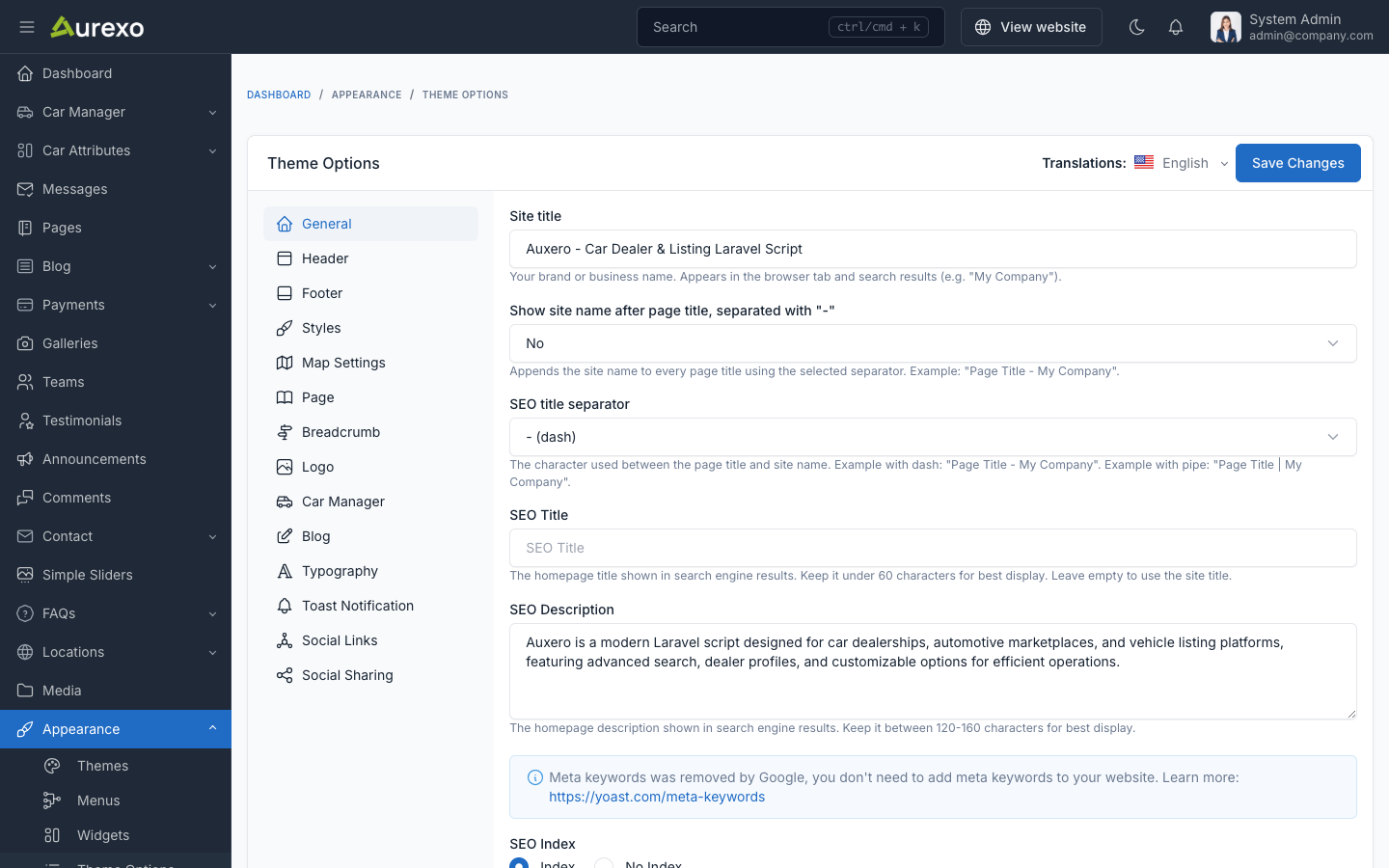
General
The General tab allows you to configure fundamental settings that shape your website's identity and basic operation.
This section typically includes options for setting your site name, description, and other essential details.
Logo
The Logo section allows you to configure your site's branding:
- Logo: The main site logo displayed in the header.
- Logo Dark: Alternative logo for dark mode.
- Favicon: The small icon displayed in browser tabs.
- Logo Height: Control the height of the logo in the header.
Header
The Header tab allows you to customize the header appearance:
- Display Header Top: Show or hide the top bar above the main header.
- Header Top Text Color: Color of text in the top bar.
- Header Top Background Color: Background color of the top bar.
- Header Transparent: When enabled, the header will have a transparent background and float on top of the page content.
- Sticky Header: When enabled, the header will remain fixed at the top when scrolling.
Footer
The Footer tab allows you to customize the footer appearance:
- Background Color: Footer background color.
- Border Color: Footer border color.
- Heading Color: Color of headings in the footer.
- Text Color: Color of text in the footer.
- Background Image: Optional background image for the footer.
Styles
The Styles tab allows you to customize the overall color scheme:
- Default Theme Color Mode: Choose between
lightanddarkmode as default. - Hide Theme Mode Switcher: Show or hide the light/dark mode toggle.
- Primary Color: Main brand color (default:
#86a21b). - Primary Color Hover: Hover state of primary color (default:
#6e8516). - Secondary Color: Secondary brand color (default:
#1a1a2e). - Heading Color: Color for headings (default:
#050b20). - Text Color: Color for body text (default:
#64666c).
Blog
The Blog tab allows you to configure blog listing and detail pages:
- Post List Meta Display: Choose which meta information to show (reading time, views count, published date, author).
- Post List Page Title: Custom title for the blog listing page.
- Post List Page Description: Custom description for the blog listing page.
- Post Style: Choose between
listandgridlayout. - Grid Items Per Row: Number of posts per row in grid layout (1, 2, or 3).
- Post Detail Style: Choose between
style-1andstyle-2for single post pages. - Post Detail Meta Display: Choose which meta information to show on detail pages.
Breadcrumb
The Breadcrumb tab allows you to customize the breadcrumb navigation:
- Background Color: Breadcrumb section background color.
- Text Color: Breadcrumb text color.
- Background Image: Optional background image for the breadcrumb section.
- Height: Height of the breadcrumb section (in pixels).
- Simple Breadcrumb: Enable for a minimal breadcrumb style.
Car Manager
The Car Manager tab provides options specific to car listings:
- Car Detail Style: Choose from 6 different car detail page layouts with visual previews.
- Car Listing Layout: Choose the default listing layout:
default- Standard grid layoutsidebar-left- Listing with left sidebar filterssidebar-right- Listing with right sidebar filterstop-map- Map displayed above listingshalf-map- Split view with map on one sidetop-filter- Filter bar above listings
- Car Listing Style: Default view mode (
gridorlist). - Car Listing Columns: Number of columns in grid view (2, 3, or 4).
- Car Card Style: Choose from 3 card display styles with visual previews.
Page
The Page tab allows you to configure page-specific settings:
- Error Page Image: Custom image for the 404 error page.
Map Settings
The Map Settings tab allows you to configure the map display for car listings:
- Map Tile Layer: Leaflet tile layer URL for map rendering.
- Map Center Latitude: Default map center latitude (default:
40.7128). - Map Center Longitude: Default map center longitude (default:
-74.0060). - Map Max Zoom: Maximum zoom level for maps (default:
18).