
Configuring Loyalty Points
This guide will walk you through the process of configuring the Loyalty Points plugin for your Botble E-commerce store.
Accessing Loyalty Points Settings
- Log in to your admin panel
- Navigate to Settings > Loyalty Points
- You will see the Loyalty Points configuration page
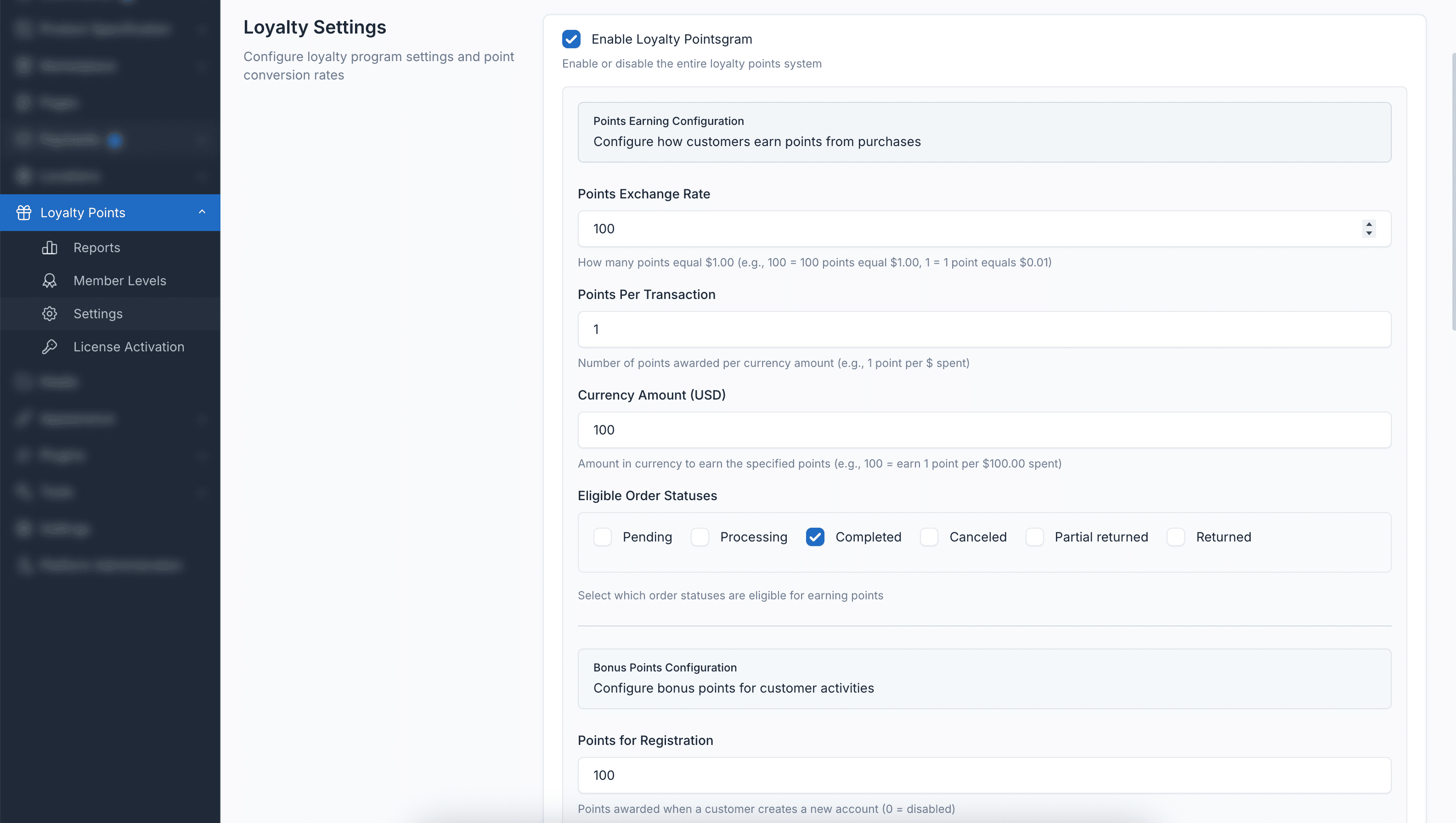
General Settings
Enable Loyalty Program
Toggle to enable or disable the entire loyalty points program. When disabled, customers will not earn or be able to redeem points.
Points Exchange Rate
Configure the value of your points:
- Points Required: Number of points that equal your currency (e.g., 100 points)
- Currency Value: The monetary value those points represent (e.g., 1 USD/EUR)
Example: If you set 100 points = $1, then a customer with 500 points can redeem them for a $5 discount.
Points Earning Settings
Earning Rate
Configure how customers earn points from purchases:
- Points Per Transaction: Number of points awarded (e.g., 1 point)
- Currency Amount: Amount spent to earn those points (e.g., per $1 spent)
Example: If you set 1 point per $1 spent, a $50 order earns 50 points.
Eligible Order Statuses
Select which order statuses trigger point awards:
- Completed: Award points when orders are marked complete
- Delivered: Award points when orders are delivered
- Processing: Award points immediately when order is placed (not recommended)
Recommendation
It's recommended to award points only for "Completed" or "Delivered" orders to prevent abuse from cancelled orders.
Bonus Points Settings
Configure bonus points for various customer activities:
Registration Bonus
- Points Amount: Points awarded when a new customer creates an account
- Set to 0 to disable registration bonus
Product Review Bonus
- Review Points: Points awarded for writing a product review
- Photo Review Points: Additional points for reviews that include photos
- Set to 0 to disable review bonuses
Referral Bonus
- Referral Points: Points awarded when a referred customer makes their first purchase
- Works with the referral/affiliate system if enabled
- Set to 0 to disable referral bonus
Birthday Bonus
- Birthday Points: Points awarded to customers on their birthday
- Requires customers to have their birthday set in their profile
- Runs automatically via scheduled task
- Set to 0 to disable birthday bonus
Points Redemption Settings
Redemption Rate
Configure how points convert to discounts:
- Points Required: Number of points needed for redemption (e.g., 100 points)
- Discount Value: Discount amount received (e.g., $1 off)
Redemption Limits
- Minimum Redeemable Points: Minimum points required per order (e.g., 100 points minimum)
- Maximum Redeemable Points: Maximum points allowed per order (e.g., 5000 points maximum)
- Maximum Redemption Percentage: Maximum percentage of cart that can be discounted with points (e.g., 20%)
Set any limit to 0 to disable that restriction.
Example: With a 20% maximum redemption percentage, on a $100 order, customers can only apply up to $20 in points discount.
Points Expiry Settings
Expiry Period
- Months Until Expiry: Number of months after which unused points expire
- Set to 0 for points that never expire
WARNING
Points expiry encourages customers to return and use their points. Consider setting a reasonable expiry period (e.g., 12 months) to maintain engagement.
Automatic Expiry Processing
Points are automatically expired via a scheduled command. Ensure your server's cron job is configured to run Laravel's scheduler:
* * * * * cd /path-to-your-project && php artisan schedule:run >> /dev/null 2>&1You can also run the expiry command manually:
php artisan loyalty:expire-pointsMember Levels Configuration
Creating Member Levels
- Navigate to Loyalty Points > Member Levels
- Click Create to add a new tier
- Configure the following:
| Field | Description |
|---|---|
| Name | Display name for the tier (e.g., Silver, Gold, Platinum) |
| Minimum Points | Lifetime points required to reach this tier |
| Maximum Points | Upper limit for this tier (leave empty for top tier) |
| Earning Rate | Multiplier for points earning (e.g., 1.5 for 50% bonus) |
| Benefits | List of benefits for this tier (one per line) |
| Status | Enable or disable this tier |
Example Tier Structure
| Level | Min Points | Max Points | Earning Rate | Example Benefits |
|---|---|---|---|---|
| Bronze | 0 | 999 | 1.0x | Basic member benefits |
| Silver | 1,000 | 4,999 | 1.25x | Free shipping on orders over $50 |
| Gold | 5,000 | 9,999 | 1.5x | Free shipping, Early access to sales |
| Platinum | 10,000 | - | 2.0x | Free shipping, VIP support, Exclusive discounts |
TIP
Tiers are based on lifetime points (total points ever earned), not current balance. This means customers maintain their tier even after redeeming points.
Permissions
Loyalty Points includes comprehensive permissions that can be assigned to user roles:
Core Permissions
- loyalty-points.index: View customer points and overview
- loyalty-points.adjust: Adjust customer points manually
- loyalty-points.transactions: View transaction history
Member Level Permissions
- loyalty-points.member-levels.index: View member levels
- loyalty-points.member-levels.create: Create new member levels
- loyalty-points.member-levels.edit: Edit member levels
- loyalty-points.member-levels.destroy: Delete member levels
Settings Permission
- loyalty-points.settings: Access to loyalty points settings
Managing Permissions
- Go to Users > Roles
- Edit a role (e.g., "Staff", "Manager")
- Find the "Loyalty Points" section in permissions
- Check/uncheck permissions based on role requirements
- Save changes
Testing Your Configuration
After configuring the plugin, test the following:
1. Points Earning Test
- Create a test order as a customer
- Complete the order
- Verify points are awarded correctly
- Check transaction history
2. Points Redemption Test
- Ensure test customer has sufficient points
- Add products to cart
- Proceed to checkout
- Apply points for discount
- Verify discount is calculated correctly
3. Member Level Test
- Create member levels with different thresholds
- Adjust a customer's lifetime points
- Verify tier assignment is correct
- Check earning multiplier is applied
4. Bonus Points Test
- Test registration bonus with new account
- Test review bonus by submitting product review
- Verify birthday bonus (if applicable)
Troubleshooting Configuration Issues
Points Not Earning
- Verify loyalty program is enabled
- Check order status is in eligible statuses list
- Ensure customer is logged in during checkout
- Verify earning rate is configured correctly
Points Not Redeeming
- Check customer has sufficient points balance
- Verify points meet minimum redeemable threshold
- Check redemption doesn't exceed maximum limits
- Ensure maximum percentage isn't exceeded
Member Levels Not Working
- Verify tiers don't have overlapping point ranges
- Check that tiers are enabled (status is active)
- Ensure minimum/maximum points are set correctly
- Levels are based on lifetime points, not current balance
Expiry Not Working
- Verify expiry period is set (not 0)
- Check Laravel scheduler is running
- Review cron job configuration
If you continue to encounter configuration issues, please refer to the Troubleshooting section or contact our support team.