
Customer Guide
This guide explains how customers experience free gifts when shopping on your store.
How Free Gifts Work
When you shop at stores using Product Gifts, you can receive free products with your order when you meet certain purchase conditions.
Seeing Gift Offers
On Product Pages
Some stores show gift offers on individual product pages, letting you know what gifts you could receive.
In Your Cart
The most common place to see gifts is in your shopping cart:
- Add products to your cart
- When your cart total reaches the minimum value, gift options appear
- You'll see a "Free Gift" or "Your Gift" section
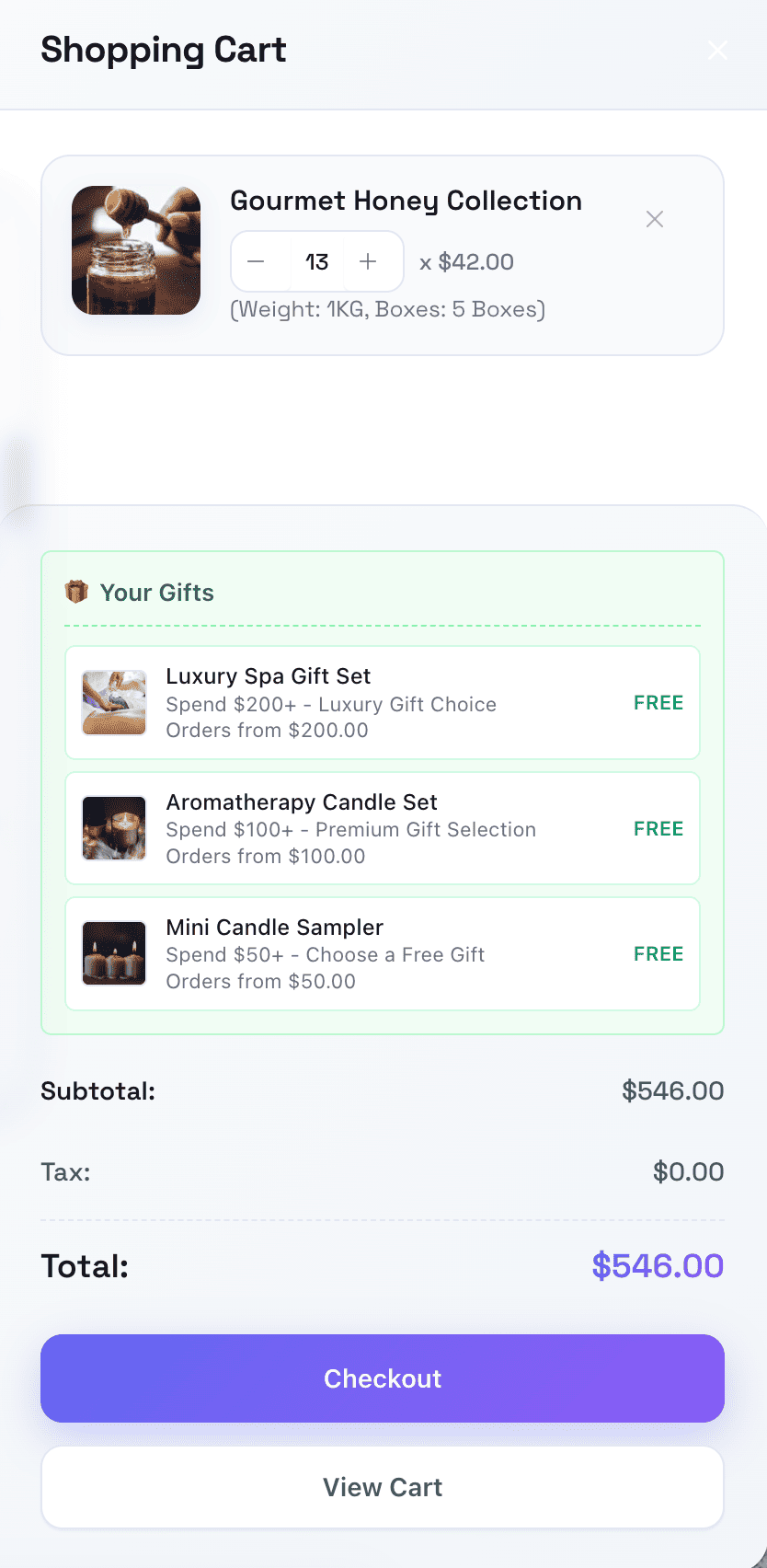
Gift Visibility
| Cart Status | Gift Display |
|---|---|
| Below minimum | Gifts not shown |
| Meets minimum | Gift options appear |
| Above minimum | Gift options remain visible |
Selecting Your Gift
Single Gift Option
If only one gift is available:
- It may be automatically selected
- Or displayed for confirmation
- Proceeds with your order
Multiple Gift Options
If you can choose from multiple gifts:
- You'll see all available gift products
- Each shows product image and name
- Original price shown struck through
- "FREE" label indicates no cost
- Select your preferred option
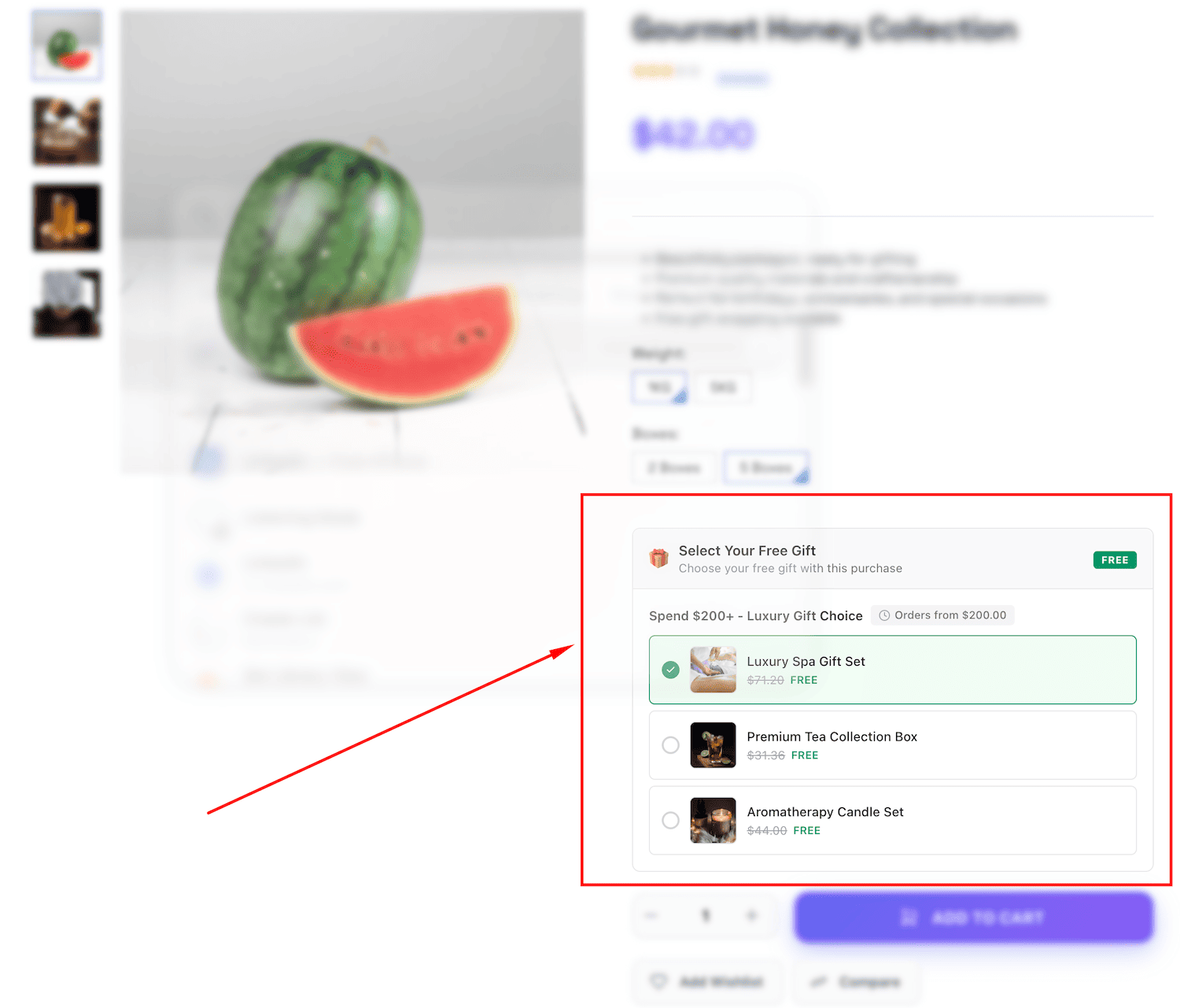
How to Choose
- Click on the gift option you want
- A checkmark or highlight indicates selection
- Your choice is remembered as you shop
Gifts at Checkout
Checkout Gift Selector
At checkout, you'll see your gift selection confirmed:
- Gift section appears with your selection
- You can change your choice if needed
- Selected gift shows in order summary
- Gift price shows as $0.00
Confirming Your Gift
Before completing your order:
- Review your gift selection
- Change if desired
- Gift is locked in when you place order
Multiple Gift Tiers
Some stores offer multiple gift levels:
Example:
- Spend $50 → Get a small gift
- Spend $100 → Get a medium gift (plus the small gift!)
- Spend $200 → Get a premium gift (plus all previous gifts!)
When you qualify for multiple tiers:
- You see gift options for each tier
- Select one gift from each tier
- All selected gifts are included in your order
Gift in Your Order
Order Confirmation
After checkout, your order confirmation shows:
- All products you purchased
- Gift products listed separately
- Gifts show $0.00 price
- Total doesn't include gift value
Order History
In your account order history:
- Gifts appear as line items
- Marked as gift or promotional items
- $0.00 cost recorded
Delivery
Your gift ships with your order:
- Included in the same package
- No additional shipping cost
- Treated like any other product
Understanding Gift Conditions
Minimum Order Value
Most gifts require a minimum purchase:
- Only products count (not shipping)
- Discounts may reduce qualifying amount
- Remove items = may lose gift eligibility
Product-Specific Gifts
Some gifts only apply when buying certain products:
- Gift appears only with qualifying products
- Removing those products removes gift option
- Check promotion terms
Category-Based Gifts
Some gifts apply to product categories:
- Buy from specific category to qualify
- Gift appears when category product is in cart
- Usually combined with minimum value
Time-Limited Gifts
Some promotions have date restrictions:
- Available during promotional period only
- May end without notice
- Complete purchase to secure gift
Frequently Asked Questions
What if I change my cart?
If you remove items and drop below minimum:
- Gift options disappear
- Add more items to restore eligibility
- Previous selection remembered if you re-qualify
Can I decline the gift?
In most cases:
- Gifts are automatically included
- Some stores allow opting out
- Contact store if you prefer no gift
What if my gift is out of stock?
- Out-of-stock gifts are hidden automatically
- Choose from available options
- Gift product may be restocked later
Can I exchange the gift?
- Gifts are promotional items
- Exchange policies vary by store
- Contact store customer service
Do gifts have warranties?
- Standard product warranties typically apply
- Check store policy for specifics
- Treat as regular purchase for support
Tips for Customers
Maximizing Gift Benefits
- Check gift thresholds before checkout
- Compare minimum values to your cart total
- Add small items if close to next tier
- Choose gifts you'll actually use
Before Completing Purchase
- Verify your gift selection
- Confirm cart meets minimum
- Check that gift appears in order summary
- Note gift is listed at $0.00
After Receiving Order
- Verify gift was included
- Check gift product condition
- Contact store if gift missing or damaged
Need Help?
If you have questions about gifts:
- Check store's FAQ for gift policies
- Contact customer service for specific questions
- Review order details for gift status
Common issues to report:
- Gift didn't appear in order
- Gift was damaged
- Wrong gift received
- Gift missing from package