
Theme
WARNING
Dev tools are removed in the download package, you need to delete folder /vendor and run command composer install to reinstall it, then you can use dev commands.
Theme Directory Structure
IMPORTANT
When developing a theme, you only need to create files in platform/themes/{theme-name}/. The public/themes/{theme-name}/ directory is automatically generated when you activate the theme or publish assets.
Botble CMS uses two directories for themes:
| Directory | Purpose |
|---|---|
platform/themes/{name}/ | Source files - Where you develop your theme. Contains views, functions, widgets, and a public/ subfolder for assets. |
public/themes/{name}/ | Published assets - Auto-generated from platform/themes/{name}/public/. Do NOT edit files here directly. |
How It Works
- You create/edit files in
platform/themes/{theme-name}/ - The CMS automatically copies contents of
platform/themes/{theme-name}/public/topublic/themes/{theme-name}/when:- You activate the theme
- You run
php artisan cms:theme:assets:publish - You save theme options
Theme Source Structure
platform/themes/your-theme/
├── assets/              # Source files (SCSS, JS before compilation) - optional
│   ├── sass/
│   └── js/
├── functions/           # Theme functions (shortcodes, theme options, etc.)
├── lang/                # Translation files
├── layouts/             # Layout files
├── partials/            # Partial views
├── public/              # PUBLIC ASSETS - these get published to public/themes/your-theme/
│   ├── css/             # Compiled CSS
│   ├── js/              # Compiled/final JS
│   ├── images/          # Images
│   └── fonts/           # Fonts
├── routes/              # Theme routes
├── views/               # Theme views
├── widgets/             # Theme widgets
├── config.php           # Theme configuration
├── screenshot.png       # Theme preview image
├── theme.json           # Theme metadata
└── webpack.mix.js       # Asset compilation config (optional)
WARNING
When you install a theme package, you only need to extract it to platform/themes/. The public/themes/ directory will be created automatically when the theme is activated.
Creating a Theme
The first time you have to create theme "demo" structure, using the artisan command:
php artisan cms:theme:create demoTroubleshoot
If you get an error like this:
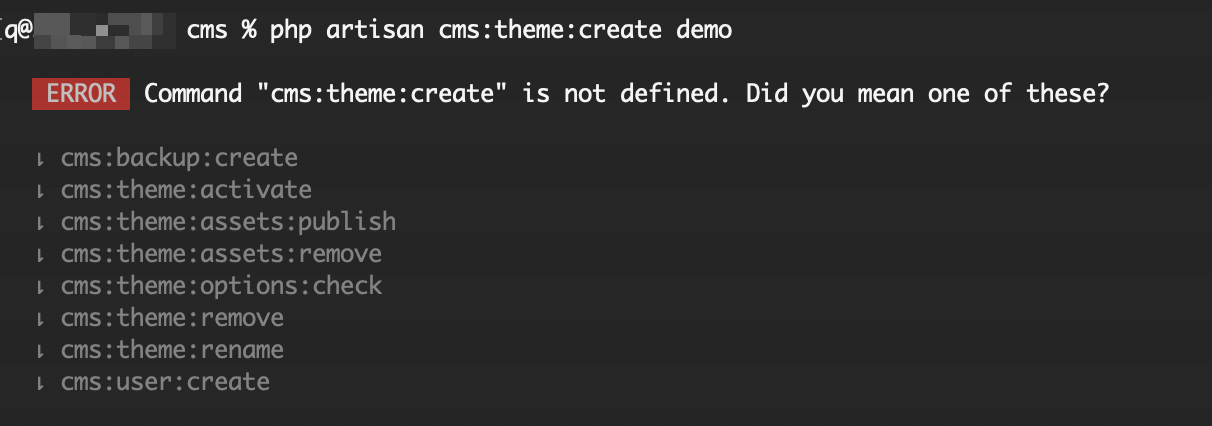
You need to delete folder /vendor and run command composer install to reinstall it, then you will have that command.
To delete an existing theme, use the command:
php artisan cms:theme:remove demoConfiguration
INFO
The main config for theme is located in /platform/themes/[theme]/config.php
The config is convenient for setting up basic CSS/JS, partial composer, breadcrumb template and also metas.
Example:
'events' => [

    // Before event inherit from package config and the theme that call before,
    // you can use this event to set meta, breadcrumb template or anything
    // you want inheriting.
    'before' => function($theme)
    {
        // You can remove this line anytime.
        $theme->setTitle('Copyright ©  2017 - Botble CMS');
    },

    // Listen on event before render a theme,
    // this event should call to assign some assets,
    // breadcrumb template.
    'beforeRenderTheme' => function($theme)
    {
        // You may use this event to set up your assets.
        // $theme->asset()->usePath()->add('core', 'core.js');
        // $theme->asset()->add('jquery', 'vendor/jquery/jquery.min.js');
        // $theme->asset()->add('jquery-ui', 'vendor/jqueryui/jquery-ui.min.js', array('jquery'));


        // $theme->partialComposer('header', function($view)
        // {
        //     $view->with('auth', Sentinel::user());
        // });
    },

    // Listen on event before render a layout,
    // this should call to assign style, script for a layout.
    'beforeRenderLayout' => array(

        'default' => function($theme)
        {
            // $theme->asset()->usePath()->add('ipad', 'css/layouts/ipad.css');
        }

    )
]
Basic usage
namespace App\Http\Controllers;

use Theme;

class HomeController extends Controller {

    public function getIndex()
    {
        $theme = Theme::uses('default')->layout('mobile');

        $view = [
            'name' => 'Botble'
        ];

        // home.index will look up the path 'platform/themes/your-theme/views/home/index.blade.php'
        return $theme->scope('home.index', $view)->render();
    }

}
INFO
Get only content "$theme->of('home.index')->content();".
To find the location of a view.
$which = $theme->scope('home.index')->location();

echo $which; // theme::views.home.index

$which = $theme->scope('home.index')->location(true);

echo $which; // ./platform/themes/name/views/home/index.blade.php
Partials
Render a partial in your layouts or views.
// This will look up to "platform/themes/[theme]/partials/header.php"
echo Theme::partial('header', ['title' => 'Header']);

// Partial with current layout specific.
// This will look up up to "platform/themes/[theme]/partials/[CURRENT_LAYOUT]/header.php"
echo Theme::partialWithLayout('header', ['title' => 'Header']);
Finding from both theme's partial and application's partials.
echo Theme::watchPartial('header', ['title' => 'Header']);Partial composer.
$theme->partialComposer('header', function($view) {
    $view->with('key', 'value');
});

// Working with partialWithLayout.
$theme->partialComposer('header', function($view) {
    $view->with('key', 'value');
}, 'layout-name');
Working with regions.
Theme has magic methods to set, prepend and append anything.
$theme->setTitle('Your title');

$theme->appendTitle('Your appended title');

$theme->prependTitle('Hello: ....');

$theme->setAnything('anything');

$theme->setFoo('foo');

// or

$theme->set('foo', 'foo');
Render in your layout or view.
Theme::getAnything();

Theme::getFoo();

// or use place.

Theme::place('anything');

Theme::place('foo', 'default-value-if-it-does-not-exist');

// or

Theme::get('foo');
Check if the place exists or not.
@if (Theme::has('title'))
    {{ Theme::place('title') }}
@endif

// or

@if (Theme::hasTitle())
    {{ Theme::getTitle() }}
@endif
Get argument assigned to content in layout or region.
Theme::getContentArguments();

// or

Theme::getContentArgument('name');

// To check if it exists

Theme::hasContentArgument('name');
INFO
Theme::place('content') is a reserve region to render sub-view.
Preparing data to view
Sometimes you don't need to execute heavy processing, so you can prepare and use when you need it.
$theme->bind('something', function() {
    return 'This is bound parameter.';
});
Using bound data on view.
echo Theme::bind('something');Using theme global
use Botble\Theme\Contracts\Theme;
use App\Http\Controllers\Controller;

class BaseController extends Controller {

    protected $theme;

    public function __construct(Theme $theme)
    {
        // Using theme as a global.
        $this->theme = $theme->uses('default')->layout('ipad');
    }

}
To override theme or layout.
public function getIndex()
{
    $this->theme->uses('newone');

    // or just override layout
    $this->theme->layout('desktop');

    $this->theme->of('somewhere.index')->render();
}
Site Information Helpers
The Theme facade provides helper methods to retrieve common site information configured through theme options.
Logo and Favicon
// Get logo URL
$logoUrl = Theme::getLogo();

// Get logo for a specific key (e.g., 'logo_light', 'logo_dark')
$darkLogo = Theme::getLogo('logo_dark');

// Get logo as an HTML <img> tag with attributes
$logoHtml = Theme::getLogoImage(
    attributes: ['class' => 'site-logo', 'alt' => 'My Site'],
    logoKey: 'logo',
    maxHeight: 50
);

// Get favicon URL
$faviconUrl = Theme::getFavicon();

// Get site title
$siteTitle = Theme::getSiteTitle();
Date Formatting
// Format a date using the theme's configured date format
echo Theme::formatDate($post->created_at);

// Format with a custom format
echo Theme::formatDate($post->created_at, 'M d, Y');
Social Sharing
// Render social sharing buttons HTML
echo Theme::renderSocialSharing(
    url: $post->url,
    title: $post->name,
    thumbnail: RvMedia::getImageUrl($post->image)
);
Other Helpers
// Get site copyright text (supports %Y and :year placeholders for current year)
echo Theme::getSiteCopyright();

// Get terms and privacy policy URL
$privacyUrl = Theme::termAndPrivacyPolicyUrl();
Using in Blade Templates
{{-- Logo --}}
<a href="{{ route('public.index') }}">
    {!! Theme::getLogoImage(['class' => 'logo', 'alt' => Theme::getSiteTitle()]) !!}
</a>

{{-- Favicon --}}
<link rel="icon" href="{{ Theme::getFavicon() }}">

{{-- Copyright --}}
<p>{!! Theme::getSiteCopyright() !!}</p>

{{-- Social sharing --}}
{!! Theme::renderSocialSharing($post->url, $post->name) !!}
Rename the theme to the new name
Using command line (Recommended):
php artisan cms:theme:rename [current-name] [new-name]This command handles all the renaming automatically, including database entries.
Manually
- Rename folder
platform/themes/[current-theme-name]toplatform/themes/[new-name]. - Delete folder
public/themes/[current-theme-name](it will be regenerated). - Open table
settingsand replace all keystheme-[current-theme-name]totheme-[new-name], change settingthemeto[new-name]. - Open table
widgetsand replace all values inthemecolumn to the new name[new-name]. - Run
php artisan cms:theme:assets:publish [new-name]to regeneratepublic/themes/[new-name].
TIP
You don't need to manually copy/rename public/themes/. Just delete the old one and the CMS will regenerate it when you activate the theme or publish assets.