
Customizing Help Center
Overview
The Help Center provides FAQ and customer service information. FAQ data is stored in a JSON file for easy editing.
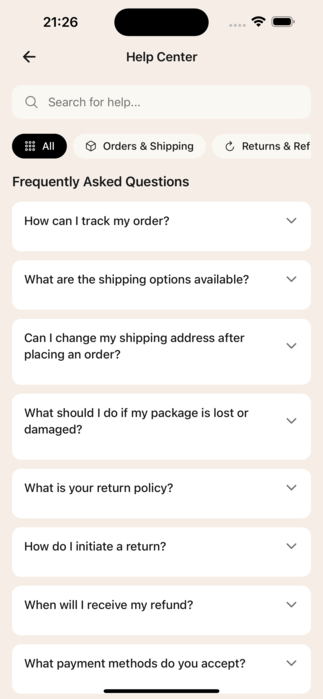
FAQ Data
Location
src/data/faq.json
Structure
json
{
  "categories": [
    {
      "id": "orders",
      "name": "Orders & Shipping",
      "icon": "truck",
      "questions": [
        {
          "id": 1,
          "question": "How can I track my order?",
          "answer": "You can track your order by going to..."
        }
      ]
    }
  ]
}
Editing FAQs
Open src/data/faq.json and modify:
- Add a category:
json
{
  "id": "warranty",
  "name": "Warranty & Support",
  "icon": "shield",
  "questions": []
}- Add a question:
json
{
  "id": 17,
  "question": "Your question here?",
  "answer": "Your detailed answer here."
}- Edit existing content: Simply change the
questionoranswertext.
Available Icons
Use icon names from Lucide React Native:
truck- Orders & Shippingrefresh- Returns & Refundscredit-card- Paymentsuser- Account & Securitypackage- Products & Stockshield- Warrantyhelp-circle- General Help
Customer Service Page
Location
app/help/customer-service.tsx
Contact Methods
Update the contactMethods array:
typescript
const contactMethods: ContactMethod[] = [
  {
    icon: Phone,
    title: t("customerService.contact.phoneTitle"),
    description: t("customerService.contact.phoneDesc"),
    value: "+1 (800) 123-4567",        // Your phone number
    action: "tel:+18001234567",
  },
  {
    icon: Mail,
    title: t("customerService.contact.emailTitle"),
    description: t("customerService.contact.emailDesc"),
    value: "[email protected]",     // Your email
    action: "mailto:[email protected]",
  },
];
Business Hours
typescript
const businessHours = [
  { day: "Monday - Friday", time: "9:00 AM - 6:00 PM" },
  { day: "Saturday", time: "10:00 AM - 4:00 PM" },
  { day: "Sunday", time: "Closed" },
];
Office Address
Find and update the address text in the component:
tsx
<Text>
  123 Your Street, Suite 100{"\n"}
  Your City, State 12345, Country
</Text>
Using App Config
For centralized contact info, update .env:
bash
APP_CONTACT_PHONE=+1 (800) 123-4567
APP_CONTACT_EMAIL=[email protected]
Then access via appConfig.contact.phone and appConfig.contact.email.
Quick Customization Checklist
- [ ] Edit FAQ categories and questions in
src/data/faq.json - [ ] Update phone number and email in customer-service.tsx
- [ ] Change business hours
- [ ] Update office address
- [ ] Update translations for all supported languages
Tips
- Keep answers concise - Clear, direct answers work best on mobile
- Organize by topic - Group related questions in categories
- Test contact links - Ensure phone/email links work correctly
- Use consistent icons - Match icons to category topics