
Adding a storefront theme
The platform ships with Amerce. This is how you add another one — Shofy, Farmart, Hasa, or any Botble-published ecommerce theme — so customers can pick it at signup and get that theme's demo content.
A theme is one self-contained directory. Its storefront, screenshots and demo data all live under platform/themes/{slug}:
platform/themes/shofy/
├── theme.json                          name, version, required_plugins
├── screenshot.png                      the card customers see at signup
├── screenshot-home-1.jpg               per-preset artwork
├── public/                             compiled assets (published to public/themes/shofy)
├── database/sample/                    ← demo data
│   ├── database-home-1.sql
│   └── database-home-2.sql
└── ... views, layouts, partials, widgets
Copy that directory and you have everything. Delete it and nothing is orphaned.
Five steps. Steps 1–3 are done once per theme, on your own machine; 4–5 are on the server.
1. install the theme code            platform/themes/{slug}
2. install any plugins it needs      platform/plugins/*
3. add its demo dump(s)              platform/themes/{slug}/database/sample/
4. publish + register                php artisan tenancy:register-theme {slug} --publish
5. sell it                           assign the theme to plans in the operator console
Verify at any point with php artisan tenancy:themes.
1. Install the theme code
Copy the theme directory out of the product it ships in:
cp -R ~/products/shofy/platform/themes/shofy platform/themes/shofy
composer dump-autoload
The directory name is the theme's slug and is used everywhere — in the catalog, in public/themes/{slug}, and in its own database/sample. It must be a bare lowercase slug (^[a-z0-9][a-z0-9-]*$); anything else is rejected as a path-traversal risk.
Some products ship several themes (Shofy ships shofy, shofy-beauty, shofy-fashion, shofy-grocery, shofy-jewelry). Each directory is a separate theme here — copy and register only the ones you want to sell.
2. Install the plugins it requires
Read the theme's theme.json:
{ "required_plugins": ["ecommerce", "some-plugin"] }Every one of those must exist under platform/plugins/. Products carry different plugin sets, so a theme from elsewhere routinely names one this platform doesn't have. tenancy:register-theme refuses a theme with a missing requirement — a store on it would fatal at boot.
cp -R ~/products/shofy/platform/plugins/some-plugin platform/plugins/some-plugin
composer dump-autoload
php artisan cms:plugin:activate some-plugin
3. Generate the demo dump
This is the step that takes real work.
Demo data is a SQL dump, not seeders. Sibling products ship their demo content as database/seeders/** classes namespaced to their own product — those classes, their plugin set and their install state don't survive being merged into this tree. Provisioning imports a dump and nothing else.
Produce one on the theme's own product, then drop it into the theme:
# in a clean install of the source product, with its demo data seeded
php artisan db:seed                       # or the product's documented seeder command

mysqldump --no-tablespaces --single-transaction --default-character-set=utf8mb4 \
  -u root -p shofy_demo > database-home-1.sql

# then, in this platform
mkdir -p platform/themes/shofy/database/sample
cp database-home-1.sql platform/themes/shofy/database/sample/database-home-1.sql
Naming: platform/themes/{theme}/database/sample/database-{preset}.sql. The {preset} part becomes the choice the customer sees at signup ("Home 1"). Ship one per demo layout you want to offer. A theme with no dumps is still valid — its stores just start empty.
Do this once and the theme is portable: zip platform/themes/shofy and it carries its own demo data to any install of this platform.
Dumps are not web-reachable
platform/ is not a web root, and publishing copies only the theme's public/ directory — so database/sample never reaches public/. There's a test pinning that.
What the dump must contain: the full schema and the demo content, including the settings table. It must be larger than 1KB — Botble's restore silently ignores anything smaller, which would otherwise "succeed" into an empty store.
Generate the dump on the theme you're shipping it for. Theme options are stored per theme, as theme-{slug}-* setting keys, and provisioning does not rename them. A dump taken from a different theme (or from the same theme under a different directory name) imports options nobody reads: the store boots on your theme with none of its options set, falling back to built-in defaults. Check with:
SELECT `key` FROM settings WHERE `key` LIKE 'theme-%' LIMIT 5;The slug in those keys must be the directory name you install the theme under.
What provisioning rewrites for you, so you don't need to clean it by hand:
| In the dump | What happens on import |
|---|---|
Links to the source demo site (*.botble.com) | Rewritten to the customer's own domain |
Demo email addresses (@botble.com) | Rewritten to @example.com (IANA-reserved, accepts no mail) |
| The demo's admin accounts | Deleted, and replaced with the store owner's |
theme setting | Overwritten with the theme the customer chose |
activated_plugins | Reconciled: plugins not installed here are dropped, ones the plan excludes are dropped, the theme's required plugins are added |
| Media files | Not shipped — missing images render as sized placeholders |
Preset slugs are unique within a theme only — two themes may both ship home-fashion, and the platform keeps them apart. Every screen and command carries the (theme, preset) pair.
Overriding a theme's demo data
A theme gets replaced wholesale when you upgrade it, which would take your edits with it. To keep demo content of your own, put it outside the theme:
database/sample/{theme}/database-{preset}.sql ← wins over the theme's own copySame filename, same rules. A dump here shadows the theme's version of the same preset, and adds new presets the theme doesn't ship. Use it for house demo content you don't want a theme update to touch; otherwise keep everything inside the theme, where it travels with it.
4. Publish and register
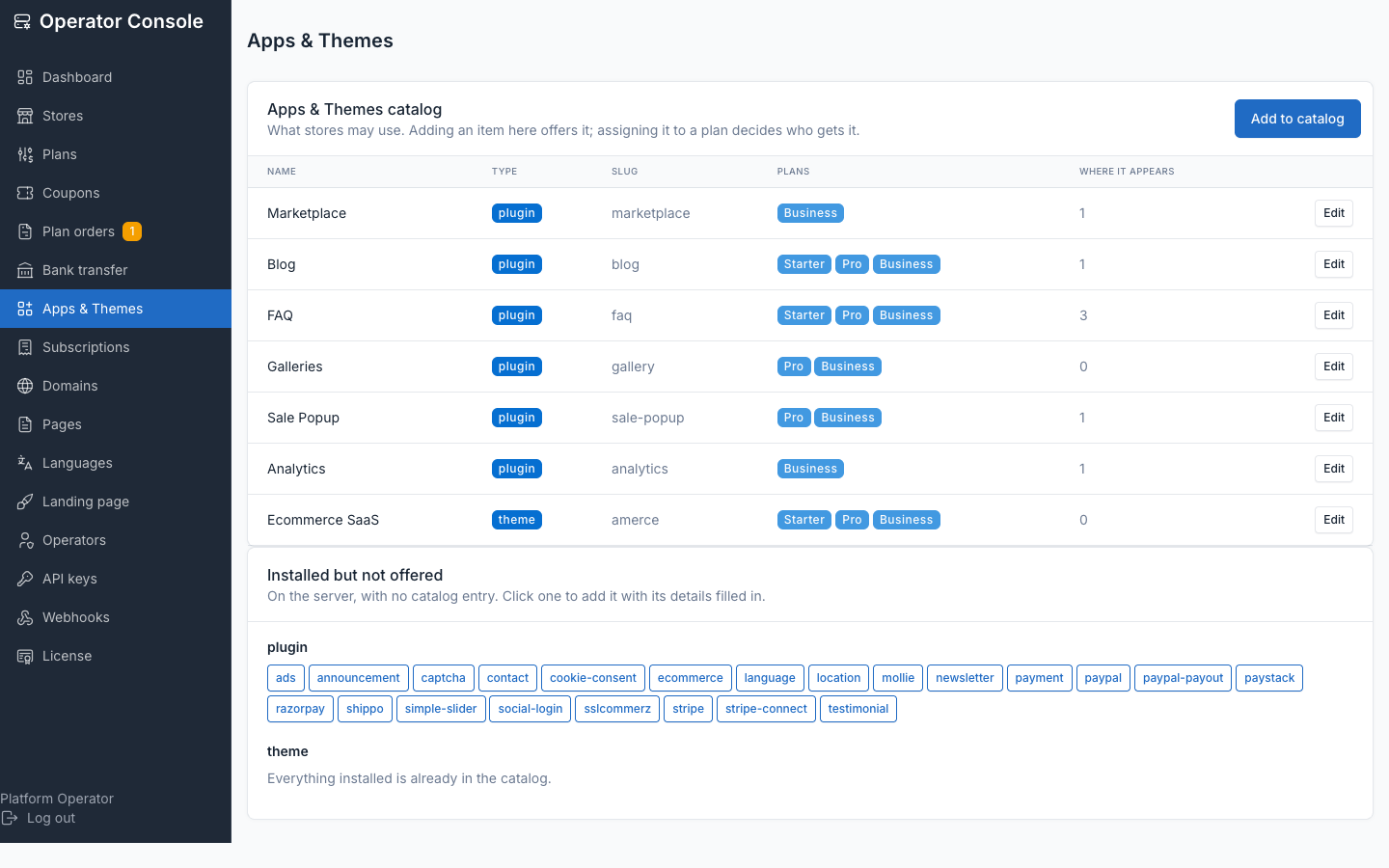
php artisan tenancy:register-theme shofy --publishTwo things happen. Publishing copies platform/themes/shofy/public → public/themes/shofy, plus the theme's screenshot*.jpg files (where the signup theme cards get their artwork). Registering validates the theme and creates its catalog_items row — refusing when the theme isn't installed, a required plugin is missing, or assets couldn't be published. Each of those would otherwise produce a store that can't be fixed from the customer's own admin.
Registration deliberately does not assign plans — that's a pricing decision, made in step 5. Add --inactive to create the catalog row switched off.
php artisan tenancy:publish-theme-assets # all themes, no registrationPublishing belongs in your deploy script
public/themes is shared by every store, so no customer request is ever allowed to write there — which means an unpublished theme renders an unstyled shop and nothing self-heals. Run tenancy:publish-theme-assets on every deploy.
5. Make it sellable
In the operator console, open each plan that should include the theme and add it. Until you do:
- With no themes curated at all, the platform fails open — every installed theme is offered to everyone. This is the default and matches a platform that has never used the catalog.
- Once you curate the first theme, gating switches on: a theme is only offered through a plan that includes it.
That's the one surprise worth remembering — curating a single theme changes the rule for all of them.
Verify
php artisan tenancy:themes
php artisan tenancy:preflight
tenancy:themes lists every installed theme with its preset count, whether assets are published, whether its required plugins are present, its catalog status, and how many stores run it. tenancy:preflight turns the same checks into hard failures for any theme the catalog actively offers.
Then do a real signup on the central domain and confirm the new store renders the theme with its demo content.
What customers can and cannot do
A store owner can switch between the themes their plan includes, from Themes in their admin. Switching:
- changes their storefront theme, its options and its widgets;
- leaves products, pages, orders and customers untouched;
- is reversible — theme options and widgets are stored per theme and never deleted, so switching back restores the previous look;
- does not re-import demo content. A store that switches theme keeps its own content, and its homepage layout comes from the new theme's defaults, so it may need arranging.
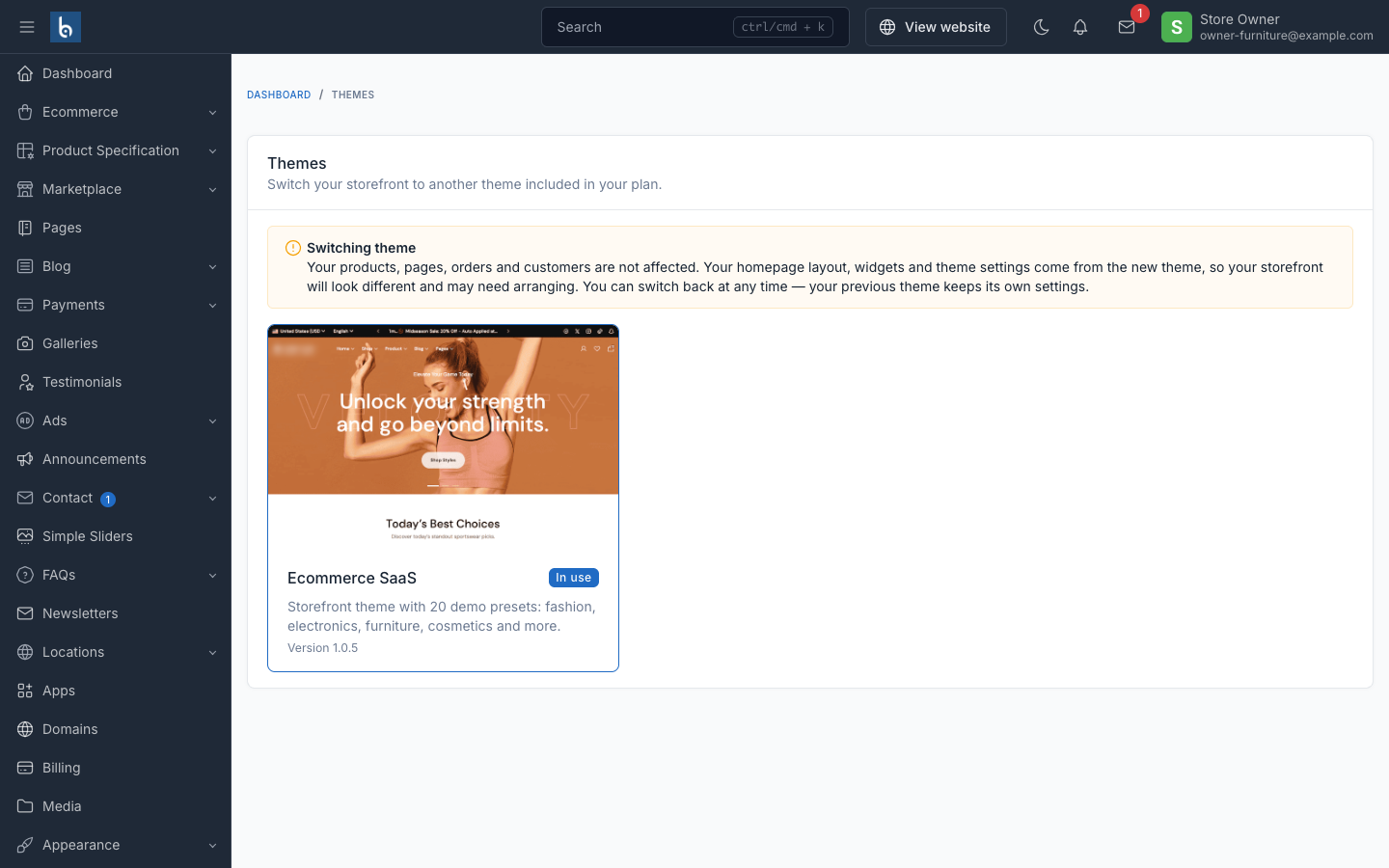
Store owners can never install, upload, remove or publish theme code. Botble's Appearance → Theme screen stays blocked for them — it does all four, on shared files.
Removing a theme
Deleting platform/themes/{slug} while stores are running it breaks those stores — their views disappear. Before removing:
php artisan tenancy:themes # the Stores column tells you who is on itDeactivate the catalog row first (stops new signups choosing it), migrate the remaining stores to another theme, and only then delete the directory. tenancy:themes reports loudly when stores reference a theme that isn't installed.
Troubleshooting
| Symptom | Cause | Fix |
|---|---|---|
| Store renders unstyled | Assets not published | tenancy:publish-theme-assets {slug} |
register-theme refuses: requires plugin(s) | Theme needs a plugin this tree lacks | Install it under platform/plugins, or drop the theme |
| Store provisions empty despite a preset | Dump under 1KB, or wrong path | Check platform/themes/{theme}/database/sample/database-{preset}.sql and its size |
| Preset missing from signup | Dump not found for that theme | Preset slugs are per theme — check the directory name |
| Demo images are grey placeholders | Media binaries aren't shipped | Expected — see step 3 |
| Theme cards have no artwork | screenshot*.jpg not published | Re-run tenancy:publish-theme-assets |
tenancy:themes shows a theme no store can pick | Catalog gating is on, no plan includes it | Add it to a plan |
Store's theme differs from the tenancy:themes row | Central/tenant drift after a failed switch | The store's own setting is authoritative; re-switch from the store's Themes screen |
Related
- Apps and themes catalog — the offer/assign/enable model
- Plans and quotas — assigning a theme to plans
- Artisan commands — full reference for
tenancy:themes,tenancy:register-theme,tenancy:publish-theme-assets