
Apps and themes catalog
Stores can turn apps on and off for themselves, within a list you control. Botble's own Plugins screen stays blocked for store owners — it installs, uploads and removes code from a filesystem every store shares, which is a platform-owner action, not a store one.
The model
code on disk  ->  catalog_items  ->  plan_catalog_items  ->  store's activated_plugins
(you install)     (you offer)        (you price)             (the owner toggles)
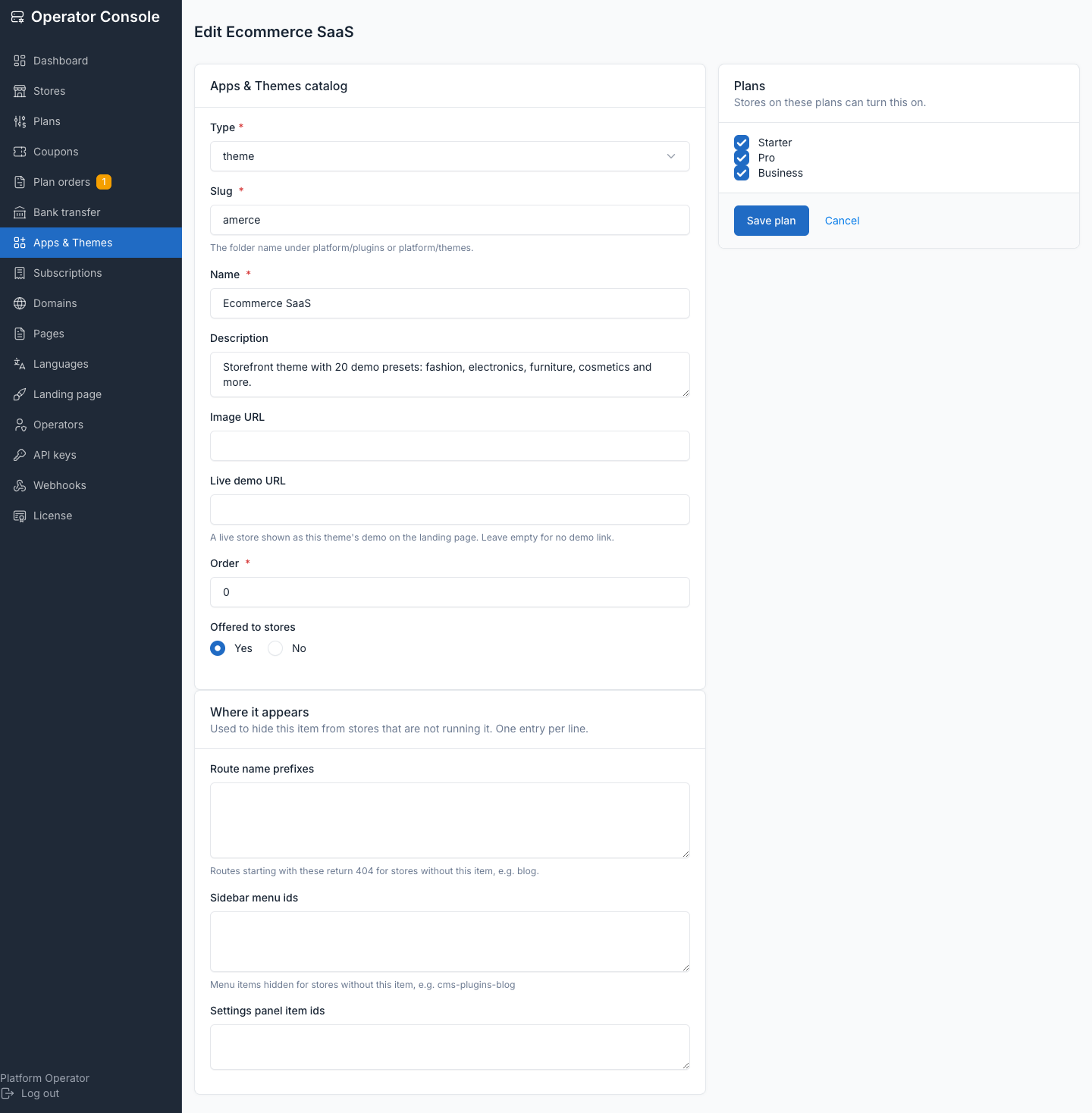
One catalog_items row describes one app (plugin) or theme:
| Field | Purpose |
|---|---|
type | plugin or theme |
slug | Directory name under platform/plugins/ or platform/themes/; must match ^[a-z0-9][a-z0-9-]*$ |
name, description, image, demo_url | What stores and the marketing site show for it |
route_prefixes | Route-name prefixes to 404 when the app is off — the enforcement |
menu_ids | Sidebar DashboardMenu ids to hide when the app is off — cosmetic |
settings_panel_items | Settings tile ids to hide when the app is off — cosmetic |
is_active | Whether the row is currently offered at all |
sort_order | Display order |
A row also tracks whether its code is still on disk (existsOnDisk()), checked against plugin_path() or theme_path() for plugins and themes respectively. Entitlement is:
(plan allowlist  UNION  grants)  MINUS  revokes  MINUS  denylist
  INTERSECT  active catalog rows  INTERSECT  what is actually on disk
tenant_catalog_grants overrides the plan in both directions — grant an app to one store without inventing a plan, or pull one from a store that abused it.
A store with no subscription gets the whole catalog, not an empty one — it matches how EnsureTenantIsActive already treats an unbilled store as entitled to serve (the admin-provisioned path, a platform run without billing). A plan with an empty allowlist is different and stays empty: that's a deliberate operator choice, not an absent one.
Adding an app to the catalog
Operator console → Apps & Themes. Items already installed on the server but not yet offered are listed at the bottom under Installed but not offered — click one and the form pre-fills from its
plugin.json(ortheme.jsonfor a theme).Check Where it appears — these three fields are what hides the app from stores not running it:
- Route name prefixes — routes starting with these 404 when the app is off. Get them from
php artisan route:list(e.g.blog.,public.blog). The pre-filled proposal is a heuristic — confirm it. - Sidebar menu ids — the app's
DashboardMenu::registerItemids (e.g.cms-plugins-blog). - Settings panel item ids — only if the app adds a Settings tile.
Shared infrastructure prefixes (
media.,settings.,system., …) are never proposed — 404ing one of those would break a store's whole admin panel.- Route name prefixes — routes starting with these 404 when the app is off. Get them from
Tick the plans that should include it. Save.
For stores that already exist, run
php artisan tenancy:backfill-plugins(dry run) to see who would change, then add--writeto apply. Add--enable-allto also switch on every entitled app a store is currently missing.
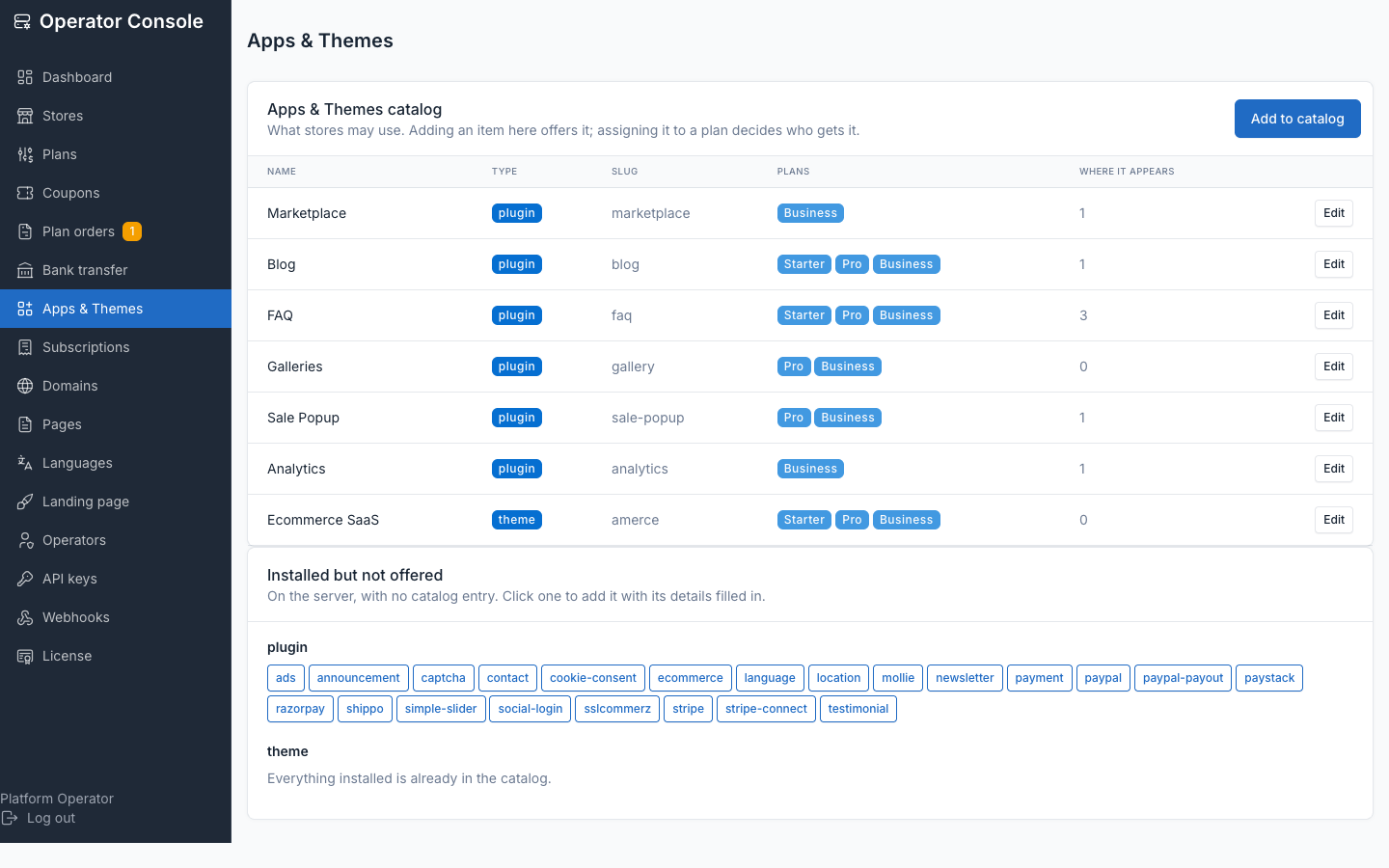
Some slugs can never be offered, whatever you click: platform tooling (tenancy, plugin-management, backup, request-log, audit-log) and plugins that write outside the store database (translation, language-advanced). The list is packages.tenancy.general.catalog.denylist — saving one of them is a validation error, not a silent skip.
The catalog is opt-in and fails open. While it's empty, nothing is gated at all — the platform behaves exactly as before this feature existed. Curating a catalog is safe to do gradually, one item at a time.
Offering vs. enabling
Three separate layers, three separate actors:
| Layer | Who | Where |
|---|---|---|
| Install the code | you, on the server | composer / file upload, as today |
| Offer it (catalog) | you | Operator console → Apps & Themes |
| Include it in a tier | you | the same screen, Plans checkboxes |
| Turn it on for one store | the store owner | their admin → Apps |
| Switch storefront theme | the store owner | their admin → Themes |
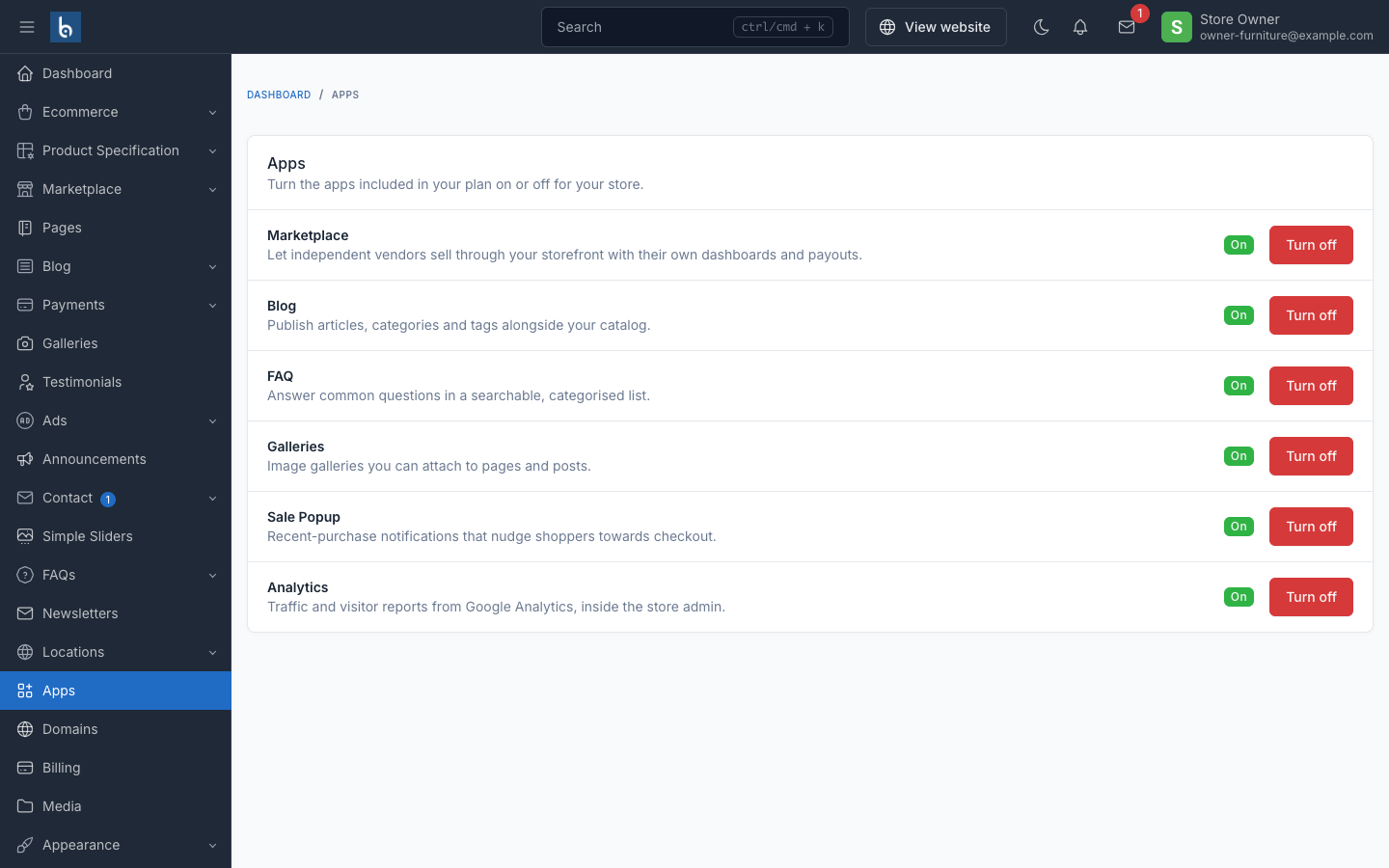
Offering an app makes it something a store's plan can include. Enabling it is the store owner flipping a switch for the app their plan already grants — see Adding a storefront theme for the theme side of this.
Why stores don't get Botble's Plugins screen
That screen installs from the marketplace, uploads zips and deletes directories. All three write code to a filesystem every store shares — one store owner could take down the platform, or read another store's data through an uploaded plugin.
Two more reasons specific to multi-tenancy:
PluginService::activate()skipsrunMigrations()when the provider class is already loaded. Under multi-tenancy it always is — registered at boot from the central database — so the second store to activate an app would silently get no tables.- It rewrites
bootstrap/cache/plugins.php, which describes the whole install, not one store.
So the tenant-side Apps screen is a separate, narrow thing: toggle what your plan already includes. Nothing more.
Why enabling is only a settings write
Everything expensive already happened at provisioning: TenantProvisioner migrates every plugin directory on disk into the new store's database, whether or not it's active, and asset publishing is global and identical for all stores. The only per-store state is activated_plugins, which already lives in the store's own database.
That's why a toggle runs no migration, writes nothing under public/, and cannot affect a neighbouring store.
Why gating happens at request time
Plugin service providers are registered during app boot, from the central database, before any tenancy middleware has identified the tenant. Every catalog app therefore has its routes registered on every request, whatever the store chose. So "off" is enforced after identification, in two places:
| Layer | Class | Role |
|---|---|---|
| Routes | BlockDisabledPluginRoutes | 404s the app's route prefixes — the real enforcement |
| Menus | RestrictTenantAdminServiceProvider | hides its sidebar and settings entries — cosmetic |
Store owners are Botble super-users, so ACL permissions can't restrict them — the route block is permission-independent, which is what makes it the actual boundary. It answers 404 rather than 403, so an owner gets no signal a screen exists behind an upgrade.
Failure modes
| Situation | Result |
|---|---|
| Catalog empty | Nothing is gated — platform behaves as before the feature existed |
| Catalog row whose code was removed | Filtered out; the store never sees it |
| Plan downgrade | The app stops running; its data is untouched; upgrading restores it |
| Store has no subscription | Gets the whole catalog (matches EnsureTenantIsActive) |
| Plan with an empty allowlist | Gets nothing — a deliberate operator choice |
| Forged slug POSTed by a store owner | CatalogException — the manager checks entitlement, not the form |
| Denylisted slug assigned to a plan | Validation error at save |
| Central DB unreachable, or code deployed before its migration | Gating degrades to off (fail open) rather than 500ing every storefront; enabling an app still throws, so nobody gains one they aren't entitled to |
Aligning existing stores
php artisan tenancy:backfill-plugins              # dry run — report only
php artisan tenancy:backfill-plugins --write      # apply
php artisan tenancy:backfill-plugins --write --enable-all --tenant=acme
Run it after curating the catalog or reassigning apps to a plan — it's the only command that reconciles what stores already have enabled against what their plan currently grants. See Artisan commands for its full option list.
Related
- Plans and quotas — assigning catalog items to a plan
- Adding a storefront theme — the theme side of the catalog
- Artisan commands —
tenancy:backfill-pluginsand the theme commands