
Digital Products
Digital products allow you to sell downloadable files and software licenses. Customers receive download links and license codes automatically after purchase.
Overview
Digital product features:
- Downloadable Files - PDF, audio, video, software, etc.
- License Codes - Unique keys for software activation
- Auto-Delivery - Instant access after payment
- Download Limits - Control number of downloads
- Expiry Settings - Time-limited access
Enable Digital Products
Navigate to Ecommerce -> Settings -> Digital Products.
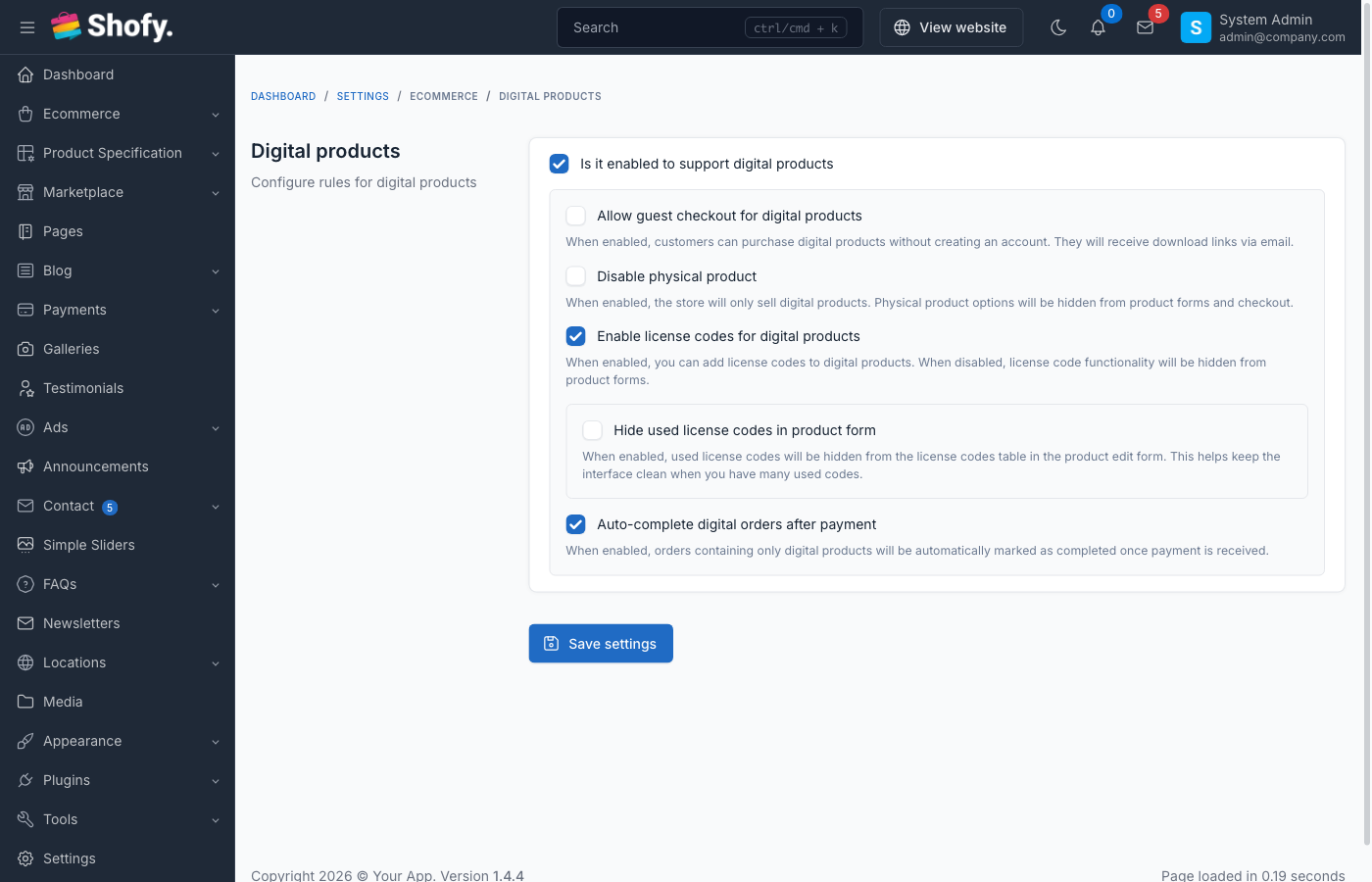
Configuration Options
| Setting | Description | Default |
|---|---|---|
| Enable support for digital products | Turn on/off digital product features | Off |
| Allow guest checkout | Let guests purchase without account | Off |
| Enable license code system | Use license key generation | Off |
Click Save after configuration.
WARNING
Digital products require a properly configured email system. Customers receive download links via email.
Creating Digital Products
Step 1: Create Product
Navigate to Ecommerce -> Products -> Create.
- Enter product details (name, description, price)
- In General section, set Product Type =
Digital - Configure pricing and settings
- Click Save
Step 2: Upload Digital Files
In the product edit page:
- Scroll to Digital Product Files section
- Click Add File
- Choose upload method:
Option 1: Upload File
- Click Browse
- Select file from computer
- System uploads and stores securely
Option 2: External Link
- Enter direct download URL
- For files hosted elsewhere (Google Drive, Dropbox, etc.)
- Check Is external link
- Configure file settings:
- File Name - Display name for customer
- File Size - Auto-detected or manual entry
- Repeat for multiple files
- Click Save
TIP
For large files (>100MB), use external links to cloud storage instead of direct upload.
Supported File Types
Common file types for digital products:
| Category | Extensions |
|---|---|
| Documents | PDF, DOC, DOCX, TXT, XLS, XLSX |
| Images | JPG, PNG, GIF, SVG, AI, PSD |
| Audio | MP3, WAV, FLAC, AAC |
| Video | MP4, AVI, MOV, MKV |
| Archives | ZIP, RAR, 7Z |
| Software | EXE, DMG, APK (use with caution) |
WARNING
Executable files (.exe, .dmg) may be blocked by some email providers. Consider providing download links via customer account instead.
License Code System
For software and activation-based products.
Enable License Codes
- Navigate to
Ecommerce->Settings->Digital Products - Enable Enable license code system
- Click Save
Adding License Codes to Products
Method 1: Auto-Generate
- Edit digital product
- Check Generate license code automatically
- Set License code quantity (number to generate)
- System generates codes on purchase
Method 2: Manual Entry
Navigate to Ecommerce -> License Codes:
- Click Create
- Select Product
- Enter License Code
- Set Status =
Available - Click Save
- Repeat for all codes
Method 3: Bulk Import
Navigate to Ecommerce -> License Codes -> Import:
- Download template
- Fill in columns:csv
product_id,product_sku,license_code,status 123,PROD-001,XXXX-XXXX-XXXX-XXXX,available 123,PROD-001,YYYY-YYYY-YYYY-YYYY,available - Upload CSV
- Click Import
License Code Status
| Status | Description |
|---|---|
| Available | Not yet assigned |
| Used | Assigned to customer |
TIP
Generate more license codes than expected sales. System automatically assigns available codes on purchase.
Download Settings
Configure download behavior per product.
Download Limits
In product edit page, Digital Product Settings section:
| Setting | Description | Recommended |
|---|---|---|
| Maximum downloads | Number of times customer can download | 3-5 |
| Download expiry (days) | Days until download link expires | 7-30 |
Unlimited Downloads:
- Set Maximum downloads =
0
No Expiry:
- Set Download expiry =
0
Access Control
| Option | Use Case |
|---|---|
| Limit downloads | Prevent abuse, ensure compliance |
| Set expiry | Time-limited promotions |
| Unlimited | Lifetime access for premium products |
Customer Download Process
Purchase Flow
- Customer purchases digital product
- Payment confirmed - Order status = Completed
- System sends email with:
- Download links for each file
- License codes (if enabled)
- Access instructions
- Customer downloads from email or account
Download from Account
Customers can access downloads from their account:
- Navigate to
My Account->Downloads - View all purchased digital products
- Click Download button
- View license codes (if applicable)
Download Link Security
Download links are:
- Unique per customer - Cannot be shared
- Time-limited - Expire after set days
- Count-limited - Track download attempts
- Logged - Monitor download activity
Email Notifications
Download Email Template
Customize the download email:
- Navigate to
Settings->Email - Find Order Completed (Digital Product)
- Edit template variables:
| Variable | Description |
|---|---|
customer_name | Customer's name |
order_id | Order reference number |
download_links | HTML list of file links |
license_codes | HTML list of codes |
expiry_date | Download expiration date |
- Click Save
Test Email
- Create test order
- Mark as completed
- Check email delivery
- Verify download links work
Managing License Codes
Navigate to Ecommerce -> License Codes.
View License Codes
Filter by:
- Product - View codes for specific product
- Status - Available or Used
- Assigned Order - Track which order used code
License Code Actions
| Action | Description |
|---|---|
| Edit | Modify code or status |
| Delete | Remove code from system |
| Mark as Available | Reset used code |
WARNING
Marking used code as available may cause conflicts if customer already activated software.
Digital Product Variations
You can combine digital products with variations:
Example: Software with different editions
- Create parent product (Software)
- Add variations:
- Basic Edition - $49
- Pro Edition - $99
- Enterprise Edition - $199
- Upload different files per variation
- Assign specific license codes per variation
Each variation can have:
- Different downloadable files
- Different license code pools
- Different pricing
Digital + Physical Products
Customers can purchase both types in one order:
- Digital products - Deliver instantly
- Physical products - Ship separately
- Order status - Completed when physical items ship
Refunds and Returns
Refund Policy
Configure digital product refund policy:
- Set return period (e.g., 7 days)
- Track downloads before refund
- Revoke access on refund
Revoking Access
When refunding digital product:
- Navigate to order
- Issue refund
- System automatically:
- Disables download links
- Marks license codes as revoked
- Removes from customer downloads
Security Best Practices
File Storage
- Use secure storage - Files stored outside public directory
- Generate signed URLs - Temporary, expiring links
- Monitor downloads - Track suspicious activity
- Watermark files - Add customer info to PDF/images
License Code Security
- Use strong format - UUID or complex alphanumeric
- One-time use - Prevent code sharing
- Verify on activation - Validate codes server-side
- Track activations - Monitor how codes are used
Preventing Piracy
- Limit downloads - Reasonable download count
- Expire links - Time-limited access
- Track sharing - Monitor if multiple IPs download
- Legal notices - Include copyright in files
- Regular audits - Review download patterns
Troubleshooting
Customer can't download files
- Check order status - Must be "Completed"
- Verify email sent - Check order emails
- Check expiry - Download link may have expired
- Check download count - May have exceeded limit
- Generate new link - Admin can create new download
License code not received
- Check email delivery - Verify email sent
- Check spam folder - Email may be filtered
- Verify codes available - Check license code pool
- Manual assignment - Admin can assign code manually
Download link expired
Admin Solution:
- Navigate to order
- Click Resend download links
- System generates fresh links with new expiry
Customer Solution:
- Contact support
- Request new download link
File upload fails
- Check file size - Verify server upload limits
- Check permissions - Ensure
storage/appis writable - Use external link - For very large files
- Check timeout - Increase
max_execution_time
Import/Export Digital Products
Export
Include digital product data:
product_type,generate_license_code
digital,1
Import
Specify product type:
name,product_type,generate_license_code
Digital Product,digital,1
Upload files and license codes manually after import.
Analytics & Reporting
Track digital product performance:
Navigate to Ecommerce -> Reports:
Metrics:
- Download count per product
- License code usage rate
- Most downloaded products
- Download errors/failures
- Average downloads per customer
Best Practices
- Test thoroughly - Purchase and download before launch
- Set reasonable limits - Balance access and security
- Use cloud storage - For large files
- Backup files - Maintain copies of all digital products
- Monitor downloads - Watch for unusual patterns
- Update files - Keep digital products current
- Clear instructions - Include usage guides
- Prompt delivery - Ensure instant access
- Quality files - Provide professional, working files
- Customer support - Help with download issues quickly
Example: Complete Setup
Product: Premium WordPress Theme
Configuration:
- Product Type: Digital
- Price: $59
- Files:
- Theme ZIP file (15MB)
- Documentation PDF (2MB)
- Video tutorial link (external)
- License Codes: 100 pre-generated codes
- Download Settings:
- Maximum downloads: 5
- Expiry: 30 days
- Email: Custom template with installation instructions
Customer Experience:
- Purchase theme ($59)
- Payment confirmed
- Receive email with:
- Download button for ZIP
- Download button for PDF
- Video tutorial link
- License code:
XXXX-XXXX-XXXX-XXXX
- Downloads ZIP, activates with license code
- Can re-download 4 more times within 30 days