
Product Reviews
The product review system allows customers to rate and review products, helping build trust and provide valuable feedback for your ecommerce store.
Overview
When enabled, the review system:
- Collects customer feedback - Customers can rate products with 1-5 stars and write detailed reviews
- Supports image uploads - Customers can attach photos to their reviews
- Moderates content - Reviews can be approved manually or published automatically
- Enables replies - Store admins and vendors can respond to customer reviews
- Displays ratings - Star ratings and review counts appear on product pages
Enable Product Reviews
Navigate to Ecommerce -> Settings -> Product Reviews in the admin panel.
Toggle Enable review to activate the feature.
Configuration Options
Basic Settings
| Setting | Description |
|---|---|
| Enable review | Master switch to turn the review system on/off |
| Only allow customers who purchased to review | Restrict reviews to verified purchasers only |
| Review need to be approved | Manually approve reviews before they appear publicly |
| Show customer full name | Display full names or mask them (e.g., "John D***") |
| Hide rating when no reviews | Don't show star rating if product has no reviews yet |
Image Upload Settings
When Allow customer upload image in review is enabled:
| Setting | Default | Description |
|---|---|---|
| Max file size | 2 MB | Maximum size per image (1-1024 MB) |
| Max file number | 6 | Maximum number of images per review (1-100) |
| Display uploaded images list | ON | Show customer review images in a gallery |
TIP
Review images help build trust. Consider allowing at least 3-6 images per review to let customers showcase products from different angles.
Managing Reviews in Admin
View All Reviews
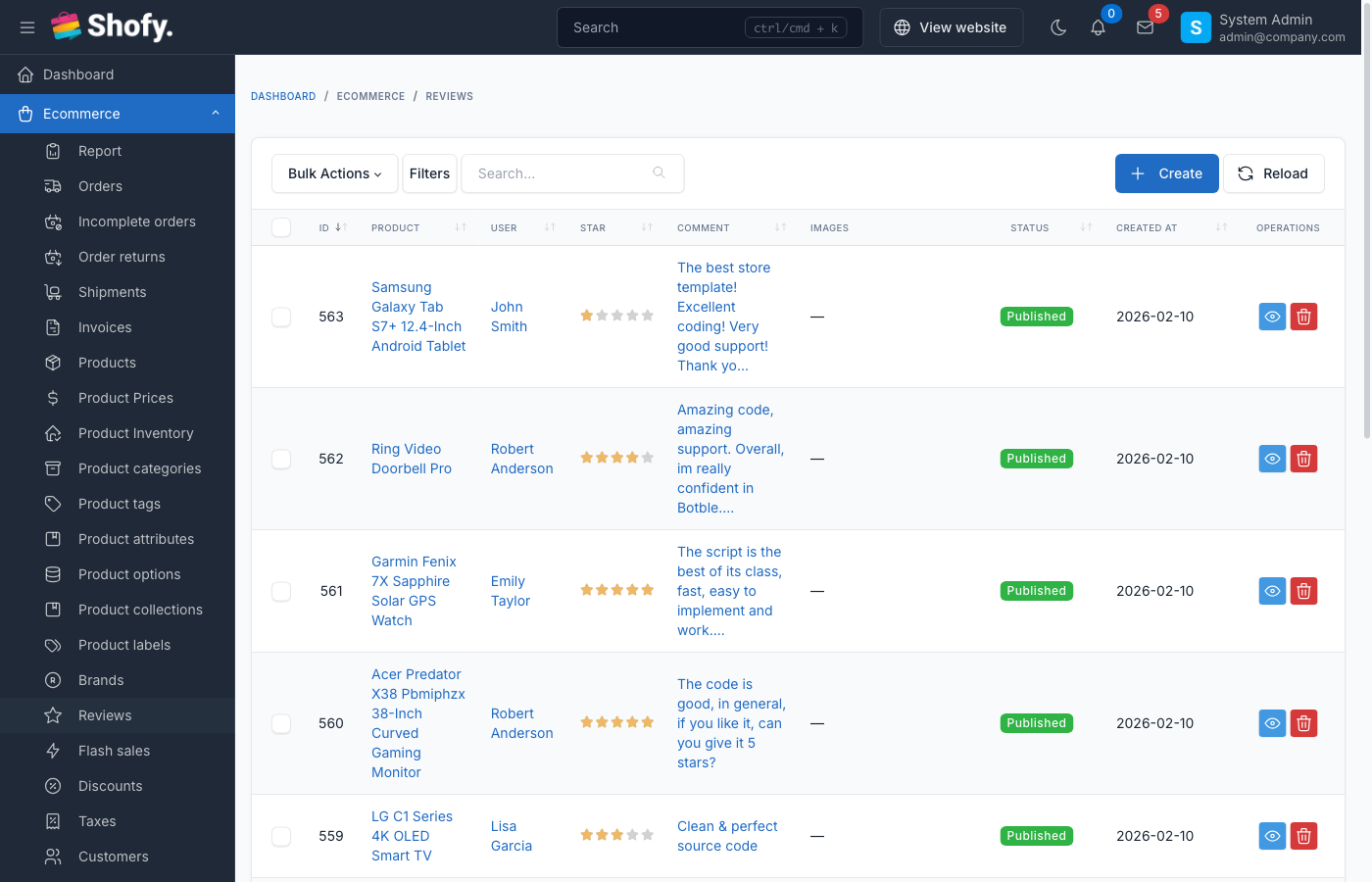
Navigate to Ecommerce -> Reviews to see all submitted reviews.
The table shows:
- Customer name and email
- Product reviewed
- Star rating
- Review status (Published/Pending)
- Date submitted
View Review Details
Click on a review to see:
- Full review text
- Attached images (if any)
- Customer information
- Product details
- Review statistics for the product
Approve or Reject Reviews
On the review detail page:
- To approve a pending review - Click the Publish button
- To hide a published review - Click the Unpublish button
- To delete a review - Click the Delete button
WARNING
Deleting a review is permanent and will update the product's average rating automatically.
Reply to Reviews
Admins with the reviews.reply permission can reply to customer reviews:
- Open the review detail page
- Scroll to the Reply to review section
- Enter your response
- Click Reply to publish
Reply editing:
- Click Edit to modify an existing reply
- Click Delete to remove a reply
- Changes are saved immediately
TIP
Responding to reviews (especially negative ones) shows customers you care about their feedback and can improve brand reputation.
Customer Experience
Submitting a Review
Customers can review products from:
- Product detail pages (click "Write a review" or similar button)
- Their order history (for purchased products)
Review form includes:
- Star rating (1-5 stars, required)
- Review text (optional)
- Image uploads (if enabled)
Review Submission Behavior
| Scenario | Behavior |
|---|---|
| Review approval disabled | Review appears immediately |
| Review approval enabled | Review enters pending status until admin approves |
| Verified purchaser only | Customer must have completed order containing the product |
| Guest customers | Cannot submit reviews (login required) |
| Duplicate reviews | Customers can only review each product once |
Editing Reviews
Customers can delete their own reviews from:
- The product page (if they're logged in)
- Their customer dashboard (if theme supports it)
WARNING
Customers cannot edit submitted reviews - they must delete and resubmit. Consider this when designing your review flow.
Review Display on Product Pages
Star Rating
Products display:
- Average star rating (1.0 to 5.0)
- Total number of reviews
- Rating breakdown by stars (e.g., "4 stars: 15 reviews")
Review List
Reviews are shown with:
- Customer name (full or masked based on settings)
- Customer avatar
- Star rating
- Review date
- Review text
- Attached images
- Admin/vendor reply (if any)
Filtering & Sorting
Customers can filter reviews by:
- Star rating (show only 1-star, 2-star, etc.)
- Search keyword
Sort options:
- Newest - Most recent first (default)
- Oldest - Oldest first
- Highest rating - 5-star reviews first
- Lowest rating - 1-star reviews first
Vendor Reply System
If the marketplace plugin is active, vendors can reply to reviews on their own products:
Requirements:
- Customer must be a verified vendor
- Vendor must own the product being reviewed
- Only one reply per review
How vendors reply:
- Log in to vendor dashboard
- Navigate to product reviews
- Click reply button on a review
- Enter reply message
- Submit reply
Vendor replies display with:
- Store name/logo
- Reply text
- Timestamp
TIP
Vendor replies appear alongside admin replies, showing the store logo/name to distinguish them.
Review Statistics & Analytics
The system automatically tracks:
- Reviews count - Total number of published reviews per product
- Average rating - Calculated from all published reviews
- Rating distribution - Breakdown by star level (1-5 stars)
These statistics are cached and updated automatically when:
- A new review is published
- A review is approved/unpublished
- A review is deleted
- A review's star rating is changed
Creating Reviews Manually (Admin)
Admins can create reviews on behalf of customers:
- Navigate to
Ecommerce->Reviews - Click Create
- Select or enter customer information:
- Choose customer - Select from existing customer database
- Or enter guest details - Provide name and email manually
- Select the product to review
- Set star rating (1-5)
- Enter review text
- Click Save
WARNING
You cannot create a review if the customer has already reviewed that product. Each customer can only review a product once.
Frequently Asked Questions
Can customers review the same product twice?
No. Each customer can only submit one review per product. They must delete their existing review to submit a new one.
Do reviews count variants separately?
No. Reviews are associated with the parent product, not individual variants. A customer who buys the "Red, Size L" variant reviews the main product.
What happens to reviews when a product is deleted?
Reviews are automatically deleted when their associated product is deleted.
Can I export customer reviews?
Reviews are stored in the ec_reviews database table. You can export them using database tools or create a custom exporter.
How do I hide all reviews for a product?
You must manually unpublish or delete each review. There's no bulk "hide all reviews" option per product.
Do review images have size/format restrictions?
Yes. Images must be:
- Under the configured max file size (default: 2 MB)
- Valid image formats (JPG, PNG, GIF, WebP)
- Within the max file number limit (default: 6 images)
Best Practices
Use verified purchaser mode - Enable "Only allow customers who purchased to review" for authentic feedback
Moderate initially - Enable review approval when launching to prevent spam, then disable if quality is good
Respond to reviews - Reply to both positive and negative reviews to show engagement
Encourage photo reviews - Reviews with images are more trustworthy and detailed
Don't delete negative reviews - Respond professionally instead; deleting looks suspicious
Monitor review quality - Check for fake, spam, or inappropriate reviews regularly
Mask customer names - Consider privacy by showing partial names (e.g., "John D***") instead of full names